
Plan the pages together.
We map the services, customer types and coverage you want to show. Residential repairs, replacement projects and commercial work may need different explanations and inquiry paths.
Make it easier to choose your HVAC business.
Quips builds HVAC websites around the services you provide and the questions customers ask. Help people find the repair they need, understand an installation and reach your team.
These garage-door website designs come from our team’s work with Garage Door Partners. They show how a company’s identity, services and contact options can work together. For your HVAC site, we would organize the pages around your repairs, installations and maintenance services.
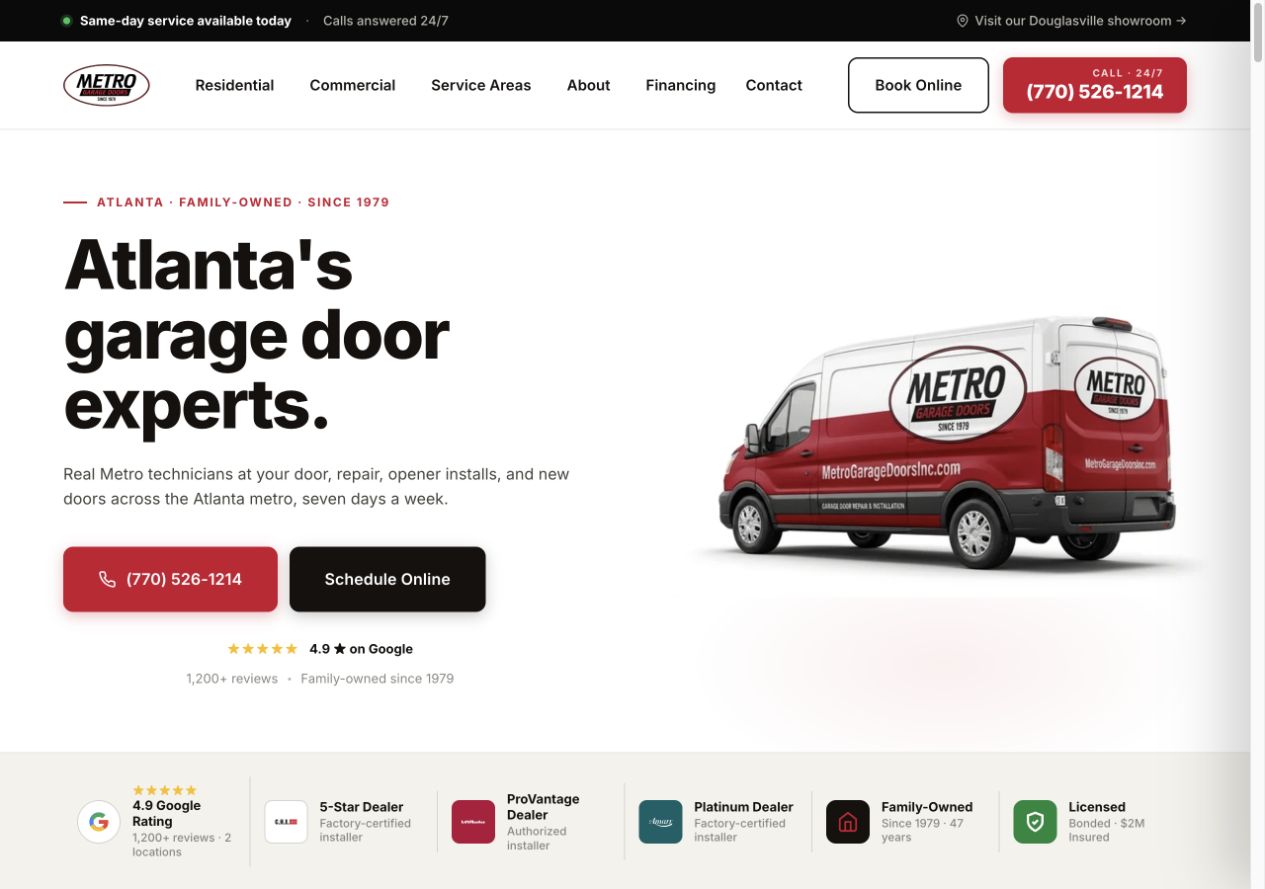
Separate residential and commercial navigation helps visitors find the right work. The company’s vehicle and contact options are prominent.
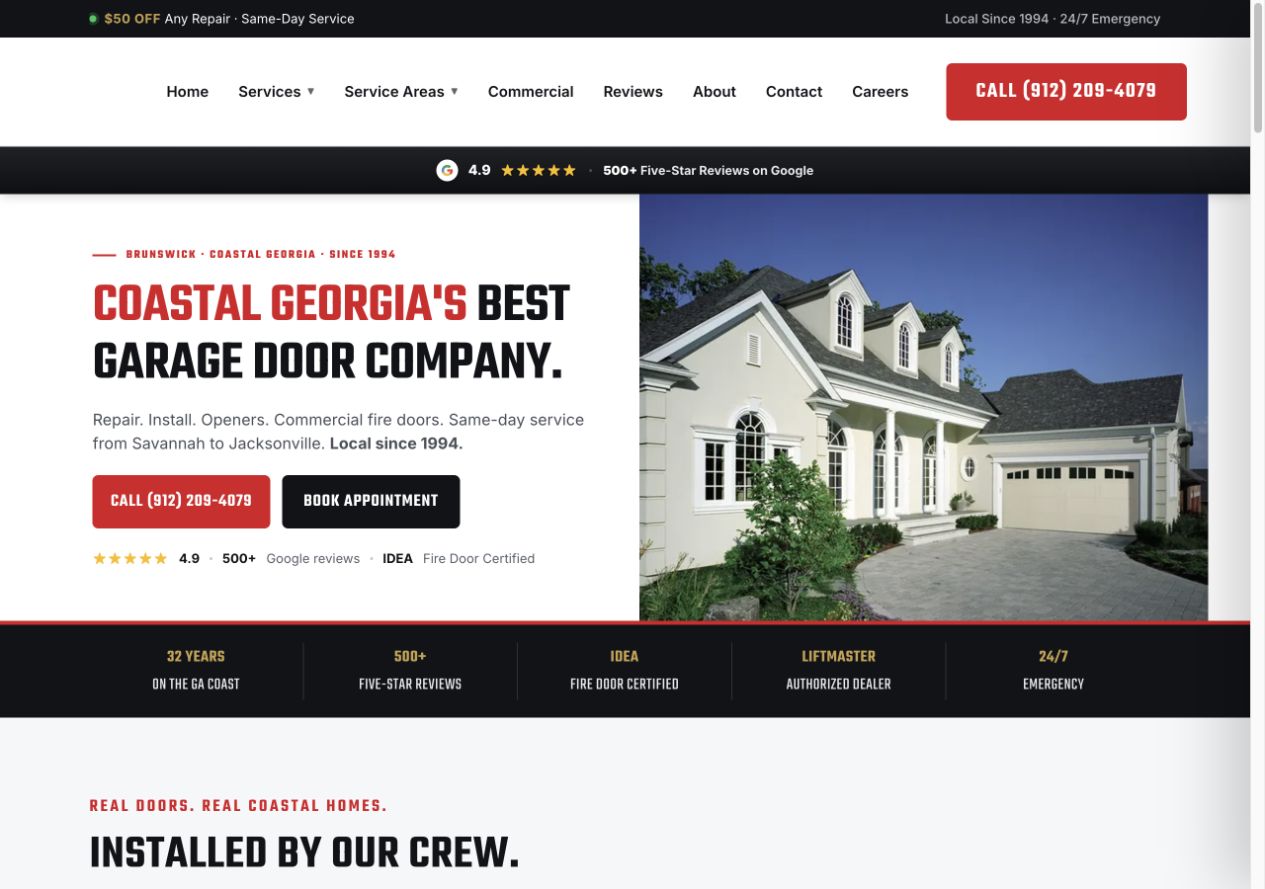
Local imagery gives the business a recognizable setting. Services, phone contact and appointments have a clear place in the layout.
Portfolio screenshots of garage-door sites, not HVAC client results. Offers and review details shown belong to the captured designs.
Quips plans, designs and builds the agreed pages around your HVAC services. We prepare content from your business details, put your photos and branding to work, and check the site before launch.
Explore our website serviceWe map the services, customer types and coverage you want to show. Residential repairs, replacement projects and commercial work may need different explanations and inquiry paths.
We turn your service details, project photos and customer questions into page content. AI helps with research and drafts; our team edits the copy, and yours confirms equipment, credentials, offers and claims.
Readable service details, clear menus and accessible contact options come first. We review the mobile layout as well as desktop, including form labels, keyboard access and error messages.
We check phone links, forms and booking links on desktop and mobile, including what the customer sees after submitting and whether the office receives the request.
Your website needs to help a homeowner with a broken AC, a family planning a replacement and a customer asking about maintenance.
Someone with no cooling on a hot afternoon needs to know whether you handle their system and serve their address. Make the phone number easy to reach, with honest answering hours.
Call the office or send a repair request.
A homeowner comparing heat pumps or replacement AC systems needs more than a call button. Show the kinds of installations you take on, real project photos and what an estimate involves.
Request an estimate. Equipment selection and pricing follow your team’s assessment.
A one-time tune-up and a maintenance agreement are different purchases. Put the included work, visit frequency and renewal terms where the customer can compare them.
Ask about a plan or request a maintenance visit.
Organize the menu around the services people need and the places your crews cover.
An AC repair page can link to replacement information for someone weighing their options. A heat-pump page can explain installation and link to the right maintenance information.
Use your team and installation photos, accurately described qualifications and customer feedback you have permission to share. Manufacturer logos, financing offers and warranty wording need your confirmation.
Review our service-page checklistA replacement inquiry needs to reach someone who can arrange an estimate. We agree where requests go, who receives them and what the customer sees after sending one.
A starting point to adapt with your office:
If you use ServiceTitan, Housecall Pro or another system, we check the available connection and scope it with you. We test the agreed handoff with a clearly identified test request before launch.
The form explains the request and asks for contact details, service location and the information needed to follow up.
We check that the test request reaches the right inbox or system, with the customer’s details intact and the expected notification. A success message alone does not prove receipt. We also check the failure message: it should explain how to retry or call the office without suggesting the request was received.
A request acknowledgement should not imply an appointment is booked unless the booking system actually confirmed it.
Keep submitted requests, qualified inquiries and booked work separate. Source tracking depends on consent and the records available.
A new look should start with an inventory. We review the pages, search activity, links and contact tools you already rely on before deciding what to keep or change.
When a rebuild is needed, we agree the migration work and who controls the domain, hosting and email settings. We plan the changeover around your busy season.
Google’s guidance on moving site URLsIf a page moves, map its old address to the most relevant new page and use an appropriate permanent redirect. Update internal links and the sitemap. Sending every old service URL to the homepage loses the visitor’s context.
Review priority service pages, mobile calls, forms, booking links and agreed tracking. Confirm email-related DNS records with the person managing the domain before changing hosting records.
Agree who monitors errors, search indexing and inquiries after launch, and how problems will be handled. Google may need time to recrawl changed pages; a redesign cannot promise unchanged rankings.
The launch is one milestone. Agree which updates and checks you want help with after it, and which your team will manage.
After page edits or new booking tools are added, check that important pages remain indexable and that images and third-party tools have not slowed the site or shifted the layout.
Google’s Core Web Vitals guidanceSeasonal tune-ups, maintenance terms and financing details can go out of date. Set an owner for those updates and an approval path for new copy or photos.
Profile management and continued content work belong in the HVAC Local SEO scope. Dedicated ads landing pages may support a specific campaign alongside the main website.
Tell us what customers struggle to find and which HVAC services you want the website to support.
We discuss your current site, platform and business priorities. We recommend improvements or a rebuild based on what the site needs to do.
Confirm pages, content, platform, integrations, migration, price and review milestones. Set out access, hosting, ownership and ongoing support before starting.
You review the design and business details. We check the customer paths on desktop and mobile, then coordinate launch and the handover.
We price the agreed work after reviewing your current site. Page count, content preparation, design, integrations and migration all affect the scope. The proposal explains the build cost and any hosting, ongoing updates or other marketing costs so you can compare the full commitment.
The schedule depends on the pages, available photos and content, access to the existing site and how quickly reviews can happen. We agree milestones after that review. A seasonal deadline should be raised at the start so we can decide what must launch first.
Yes, when the platform and site are suitable. A clearer repair page or a better estimate form may be enough. We review useful content, search activity and contact paths before recommending focused changes or a rebuild.
We discuss the platform after reviewing your existing setup, editing needs, integrations and support requirements. The proposal names what we will use and who can make changes.
We set out domain control, account access, website files, hosting, maintenance and what happens if you change providers before work begins. Bring your current agreement if you are moving from another agency; access and transfer rights can affect the plan.
The build includes the agreed search foundations: useful page structure, titles, internal links, mobile layouts and indexing checks. Ongoing HVAC Local SEO, Google Business Profile management and new content are scoped separately. A new website does not guarantee rankings.
We first check the software, account permissions and available forms or integrations. A booking link, an appointment-request form and a connection that creates a CRM record are different pieces of work. We agree and test the supported path; an automatic booking or dispatch connection is not assumed.
Bring us your current site and your plans. Let’s work out what your next HVAC website needs.
Get started