

Start with the jobs you want more of
A garage door repair call and a new-door estimate need different marketing. The first customer may be trying to get a car out of the garage. The second may be comparing styles, insulation, price and installation timing.
Decide which work you can take before choosing where to advertise. More calls will not help if they arrive from the wrong towns or ask for jobs your team cannot handle.
Where should you start?
- Few nearby customers find you
- Start with local searchCheck that your Google Business Profile lists the right services, service area, hours and phone number. Make sure your website explains those services and makes contacting you easy.
- Too many calls are for the wrong jobs or towns
- Review search and location targetingCompare the actual requests with your service-area plan before adding spend.
- You can take more repair calls
- Check LSA eligibility and available appointmentsIf eligible, test whether LSA brings repair jobs you can serve profitably. Compare Search ads when you need more control over searches and pages.
- You want more installation estimates
- Show door styles and completed installationsExplain how to request an estimate. Send installation ad clicks to that page.
- You are considering buying leads
- Ask what you are paying forConfirm job types, sharing, territory, charges and pause rules before a limited test.
- You have useful local relationships
- Build a referral processTell partners which jobs to send and who to call.
- Suitable inquiries are not becoming jobs
- Check response and follow-upAssign someone to return missed calls, reply to forms and follow up on estimates before buying more leads.
Repair calls and installation estimates need different paths.
“My door won’t open.”
Repair inquiry
- Find help nearbySearch, Maps, an ad or a referral.
- Check the practical detailsDo you cover the address, handle the problem and have availability?
- Agree a service visitExplain any visit fee and how the repair price is approved. Confirm an available time.
“We want a new door.”
Installation inquiry
- Explore the optionsDoor styles, completed installations and how to get an estimate.
- Arrange an assessmentConfirm the property, project scope and decision-maker.
- Review the proposalExplain what the quote includes, door options, installation dates and when you will follow up.
Send repair ads to a repair page and installation ads to a page with door options and an estimate request.
Separate repairs, openers and new doors
For repair work, answer four questions: do you handle this problem, do you serve this address, when can someone come, and what will it cost?
Be ready for a price question before the customer agrees to a visit. A description over the phone may not establish the fault, parts or labor needed. Explain any visit fee and how you confirm the repair price after inspection. The phone-quote script below shows how to handle that conversation.
Name the services you actually provide. Broken springs, doors off track and opener faults may need different equipment or technician experience. A vague promise to fix “any garage door problem” can create expectations the office cannot meet.
Opener work also has more than one intent. Someone searching for a remote battery may want a part or instructions. Someone asking for an opener installation quote may be ready to hire. Keep those searches distinct when reviewing advertising.
New-door customers need more help choosing. Show the types of doors you install, examples of completed work you can share, and what happens during an estimate. Explain whether measurements, removal of the old door and disposal are included in the quoted scope.
If you handle commercial doors, give that work its own explanation. A homeowner replacing a two-car garage door and a warehouse manager arranging loading-door service should not have to decipher the same generic page.
Write a short brief the office can use
Start with these decisions. Use your recent jobs, technician schedule and supplier information to answer them.
- Priority work: which repairs, opener jobs or installations do you want more of?
- Coverage: which towns can you serve reliably, and which depend on the job?
- Capacity: who can take the work, and when?
- Limits: which brands, door types or jobs do you decline?
- Next step: should the customer call, request a visit or arrange an estimate?
For example, a company with repair technicians available this week but an installation backlog should not use “new doors installed fast” as its main advertising message. It could prioritize repair inquiries while offering honest installation estimate dates.
Find what is holding back the work
Review a recent complete month of inquiries with whoever answers the phone. Mark the requested work, location, response, outcome and reason a job was lost when known.
If too few people contact you about work you can take, improve how customers find you. If many callers ask for services you do not offer, sharpen the targeting and page copy. If suitable callers cannot reach anyone, fix the response process before buying more traffic.
Keep unknowns visible. A caller who never answered your follow-up is not automatically a price objection. A missed call is not proof that the person booked a competitor.
The garage door marketing overview explains how the services fit together. Here, use the job brief to choose the first channel and the first page to improve.
Make local search useful to the customer
Start with the information a nearby customer uses to decide whether to contact you. Your Google Business Profile and website should agree on who you are, what you do and how to reach you.
A complete profile is a foundation. It is not a promise that you will appear everywhere you list as a service area.
Check the public profile, not just the editor
Sign in to the account that manages your Business Profile. Check the real business name, the most specific accurate category available, phone number, website link and operating hours.
Use the name customers know from your business. Do not add towns or services to the name just to target searches. Keep any description of emergency or after-hours service consistent with what your team can actually provide.
If customers do not visit your address, hide it from the public profile and set accurate service areas. A service-area business should not use an unstaffed virtual office to appear local in another town. Google’s business representation guidelines explain the relevant address and eligibility rules.
Then look at the public listing on a phone. Follow the website link, check the destination and confirm that the displayed phone number reaches the right team. Coordinate any test call with the office.
Check what customers see on Google
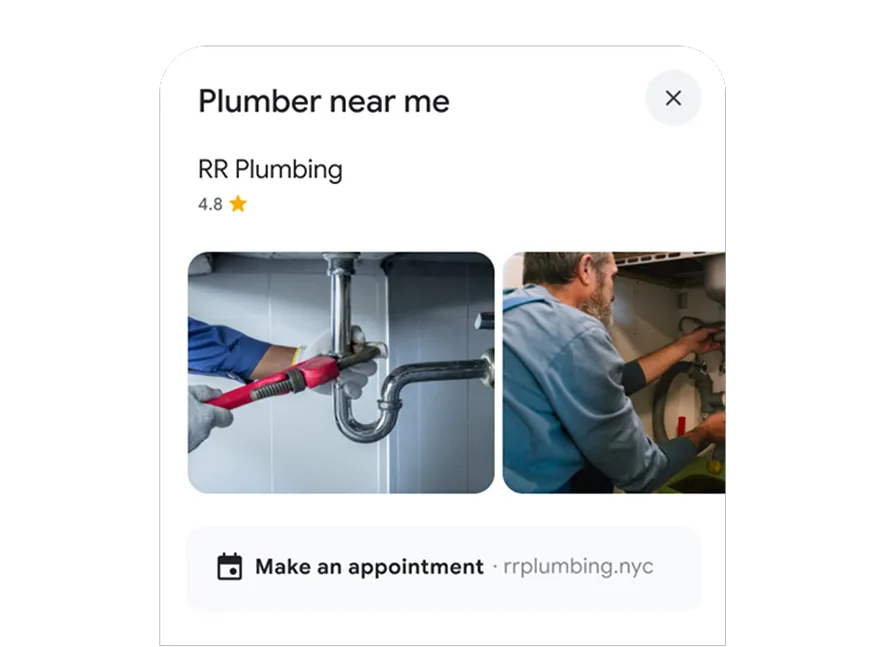
Open your own listing on a phone
- Name: match your real business name.
- Photos: show your team and completed garage door work.
- Contact: test the website, phone and any appointment link you display.
- Details: check your services, towns and operating hours.
List your services where customers can find them
Open your Google Business Profile while signed in to its managing account. Select Edit services. Add the repairs and installations you offer, then open each service to check its description and any price you have entered.
List the repair and installation jobs you offer
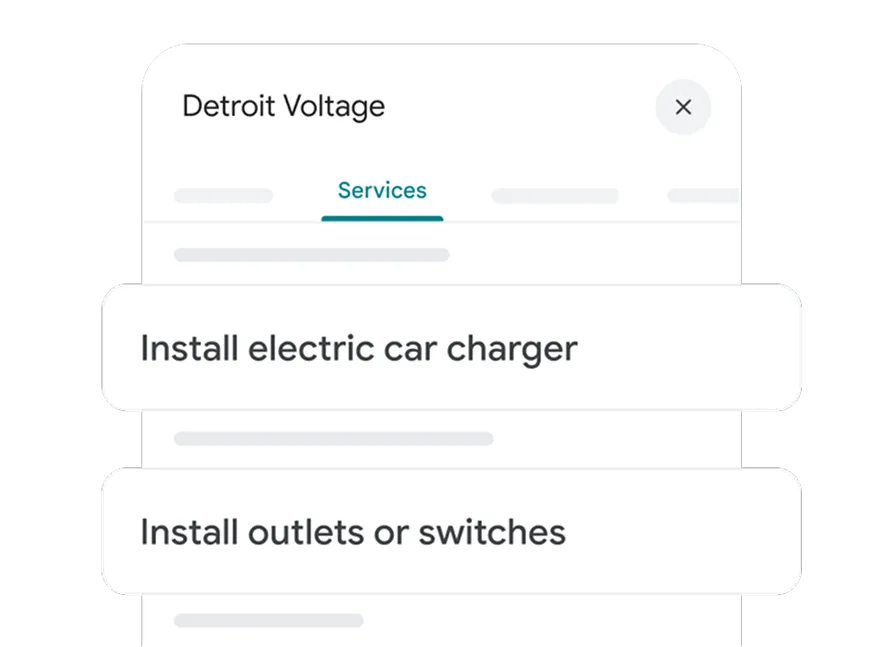
For a garage door company
- Garage door spring repair
- Garage door opener repair
- Garage door installation
Only add jobs your team handles. Open each entry to check its description and any price.
If your service is missing, look under Add more services for Add custom service. Only enter a price when it accurately describes what the customer will pay for that service.
Google’s steps for adding and editing services
Keep service names simple: the job itself, without a phone number or price in the name. Google may highlight matching services on your profile; customers can also find the services list in Google Maps. See Google’s service-editing instructions.
Give each main service its own clear page
A customer searching for spring repair should land on a page that explains spring repair. A customer exploring a new door should see door options, installation examples and the estimate process.
You do not need a separate page for every small wording variation. Build around distinct customer tasks, then answer the questions your office hears about each one.
A repair page can explain the symptoms you assess, your service area, how scheduling works and how any visit fee is communicated. It should not try to diagnose a broken spring from a search phrase or publish hazardous repair instructions to attract traffic.
An installation page can show your actual product range, explain how measurements are confirmed and describe what the quote covers. Only advertise financing, warranties or same-day work when the terms and availability are accurate.
Use real work photos with permission. A caption such as “insulated steel door installed on a two-car garage” helps the customer understand the work. A dramatic stock photograph does not establish what your company installs.
Earn reviews through a repeatable request
Make the request part of the completed-job process. Give genuine customers a simple review link and let them describe the experience in their own words.
Ask consistently rather than sending only happy customers to Google. Do not offer discounts, gifts or other incentives for a review, and do not ask people to change a negative review in return for a benefit. See Google’s review-request guidance.
Example request: “Thanks for choosing us for your garage door work. If you’d like to share your experience, you can leave a Google review here: [link].”
Reply without exposing an address, invoice details or other private information. If a review raises a service problem, explain how the customer can contact you to resolve it. Keep the response useful to future readers as well.
Measure visibility alongside actual inquiries
Google describes local ranking in terms of relevance, distance and prominence. Complete information and genuine reviews help customers assess you, but adding more service areas does not remove distance from the equation. Read Google’s local-ranking guidance.
Review profile activity alongside call logs, forms and completed jobs. A website click is not a qualified lead. A tap on the call button is not proof that the call connected.
For a deeper explanation of each channel’s role, use the Business Profile versus website comparison. For help with the trade-specific work, see local SEO for garage door companies.
Match Google Search ads to the job
Google Search ads can put your company in front of people actively searching for garage door help. You pay for clicks, so the search, the landing page and the work you want must line up.
Before planning the launch, check the verification requirement. Google requires advanced verification for garage door repair advertising in the United States. This applies to relevant Google Ads advertising, not only Local Services Ads. Confirm your account’s requirements through Google’s local-services advertising policy.
Group searches by customer intent
Start with the jobs in your brief. Separate repair demand from new-door installation where each needs different copy, a different page or a different budget decision.
Repair searches include “garage door repair near me” and “garage door spring repair.” Installation searches might include “new garage door installation” or “insulated garage door installer.” Choose keywords for services you offer, then review the searches that trigger your ads.
Some searches need a closer look. “Garage door opener” can mean shopping for a product, troubleshooting or hiring an installer. Do not assume every click on a product phrase is a service opportunity.
Separate repair and installation campaigns when you need different budgets, service areas or ad schedules. Keep the structure simple enough to review costs and completed jobs for each type of work.
Send each inquiry to a page that answers its questions
/garage-door-repair/
Garage door repair in [service area]
Tell us what’s happening. We’ll check coverage and explain the next available visit.
- Show
- Problems you handle, service area and real hours.
- Explain
- Visit fees and how scheduling works.
Next stepCall to discuss a repair
/garage-door-installation/
Find the right door for your home
See examples of our work and learn what happens during an installation estimate.
- Show
- Completed installations, door styles, windows and insulation options.
- Explain
- Assessment, proposal and installation process.
Next stepRequest an installation estimate
Make the promise and the page agree
A repair ad should lead to clear repair information and an easy way to ask about availability. If your office must confirm a slot, say so. Do not make “Book now” imply that a request form has reserved a technician.
A new-door ad should lead to installation information, useful project examples and a clear estimate process. Sending that visitor to a generic emergency-repair page adds work at the moment they are trying to compare companies.
Keep offers specific and accurate. If a quoted price excludes parts or applies only to a defined service, make those conditions clear. Do not use a low inspection price to imply the total repair price.
The service-page checklist walks through clarity, mobile usability and inquiry delivery. Apply it to the exact advertising destination.
Check where the traffic comes from
Check the location option with your marketer. The default, Presence or Interest, can include people outside your area who show interest in it.
Presence focuses on people likely in or regularly in the selected area. It can be a useful starting point for local repair campaigns. But an owner living elsewhere may still need work at a local property.
Location targeting uses signals and is not perfectly accurate. Review the location information available in the account and compare it with the towns of actual inquiries. A neat targeting map does not prove every lead is in range. Google explains location-targeting options here.
Use search terms to find waste
Review the searches that triggered your ads
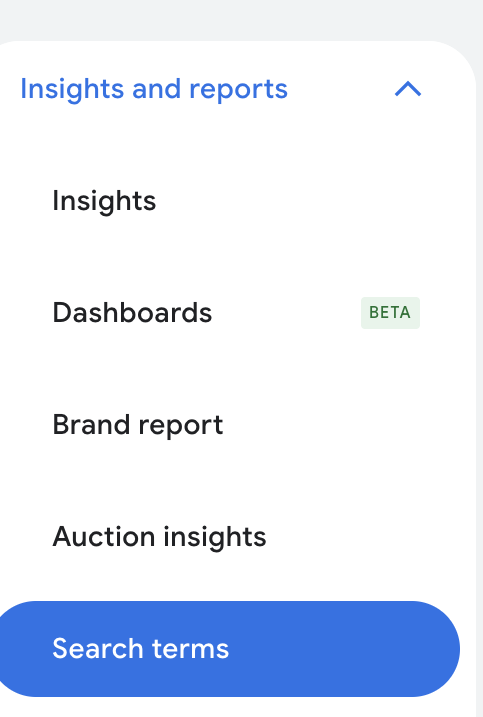
Open Search terms
In your individual Google Ads account, choose Campaigns → Insights and reports → Search terms.
- Select a repair or installation campaign.
- Set a date range with enough inquiries to review.
- Compare the queries with the jobs you offer. Investigate parts-shopping, DIY and job-seeker searches.
Follow the full search-terms walkthrough for columns and exclusions.
Review the actual queries reported in the account. Look for repeated searches about jobs, training, DIY instructions, parts you do not sell or services outside your scope.
Add exclusions carefully. If you do not sell replacement remotes, the relevant remote-shopping queries may be poor fits. But excluding every search containing “opener” would also block people who need an opener installed or repaired.
Match types and negative keywords behave differently, and the search-terms report does not show every query. Use the search-terms walkthrough for the detailed review instead of applying a generic negative list blindly.
Test the contact options and set a spending limit
Before paying for visits, test the phone and form and verify conversion tracking. Follow the inquiry-handling checks below; test the page directly rather than clicking your own ad.
Choose a budget your business can sustain while collecting useful evidence. There is no universal amount that guarantees a set number of garage door jobs. Auction conditions, conversion rates, job mix and response all matter.
Use the Google Ads budget guide to work through your own assumptions. The garage door Google Ads service page explains the managed work behind the campaign.
Get more useful LSA leads within your capacity
Local Services Ads offer a different route: the customer can assess your profile and contact the business without first visiting a landing page. Charges are based on leads under Google’s billing rules, rather than the click model used for Search ads.
Google treats garage door services as an urgent LSA category. Its US requirements include service-professional background checks and Advanced Verification, alongside other applicable business checks. Review the garage door screening requirements and your account’s checklist before planning a launch.
Requirements vary by location and business. Verification for one advertising product should not be assumed to complete every requirement for another.
Check your Local Services Ads business details
Confirm the business details, actual services, coverage and operating hours. Check the phone number and who receives messages or other lead notifications available in your account.
Connect the correct, verified Google Business Profile to LSA and check that the business information matches. Google uses Business Profile reviews in LSA; manage those reviews through your Business Profile. Then check that LSA displays the correct business and reviews.
Google lists review rating, review count and average response time among the factors affecting LSA ranking. Bid, relevance and other profile-quality factors also matter. More budget does not guarantee placement or suitable work. See Google’s ranking explanation.
Make answering part of the advertising plan
A repair caller may need help now. Decide who answers during the advertised hours, who covers breaks and what happens when the technician is driving.
If nobody can handle inquiries after hours, do not present a round-the-clock response promise. If you use an answering service, give it the same coverage, fee and scheduling instructions as the office.
Review missed calls and unanswered messages. You need to know whether the problem is too little demand, poor-fit inquiries or useful leads that nobody reached in time.
Expand good lead volume deliberately
If LSA is producing suitable, profitable work and the team can serve more customers, it makes sense to pursue more of those leads. Do not restrict a productive source simply to spread the budget evenly across channels.
Before increasing spend, check whether the existing budget is actually limiting delivery. Then review job types, service area, response coverage and available appointment capacity. Fix the limit you can actually identify.
After a change, compare equivalent periods and allow for seasonality and delayed job outcomes. Keep repair calls separate from installation estimates so a shift in job mix does not disguise the result.
A charged lead is not guaranteed revenue. Missed calls can still be billable under Google’s rules. Review charges and any available credits; do not assume that every inquiry you fail to book qualifies for a refund. Check current LSA billing rules.
Use our LSA versus Google Ads comparison for the detailed ranking, billing and channel-choice questions. The aim here is to choose the work you want, handle the contacts well and expand what pays off.
Choose coverage you can serve profitably
A larger service area can bring more inquiries and more time on the road. Those two outcomes need to be evaluated together.
A distant repair that occupies most of a technician’s afternoon may be a poor fit even when the lead looks inexpensive. A planned installation in the same town could make sense with the right schedule and scope.
Set coverage around the work you can deliver
- Core area
- Work your team can cover reliably under its normal scheduling and visit terms.
- Conditional area
- Accept only when the job type, travel time and schedule make sense. Explain any different terms before agreeing a visit.
Check booked work and drive time before widening ad coverage.
Give the office a core area and an exception rule
Define the towns you routinely serve. Then agree how the office handles requests outside that area: decline, offer a different date, quote a disclosed travel charge or assess the job before accepting it.
Keep those decisions consistent across your website, advertising and intake script. If an outer town is conditional, avoid copy that promises immediate coverage there.
Use driving time as well as distance. Traffic, bridges, dispatch location and the need to collect parts can change the economics. The same radius can mean very different trips on different sides of town.
Check the work behind each town
Compare recent inquiries with completed jobs by area. Record travel time, job type, cancellations and repeat visits where available. Small samples are a prompt to investigate, not a reliable verdict on an entire town.
If one area repeatedly generates requests you cannot take, first check the advertising settings and page promises. If the work fits but travel makes it unprofitable, consider planned service days or narrower coverage rather than assuming a lower lead price will fix it.
Do not add business locations to Google Business Profile where you do not operate. An accurate service-area listing communicates where you work; it does not create a physical business location or guarantee visibility in every town.
Use location pages only when they help
A useful town page answers a real customer’s questions about your coverage and services. It might include approved local project examples, the work available there and a truthful scheduling explanation.
Swapping a city name into the same paragraph dozens of times adds little. Build pages where you have something specific to say, and link them naturally from the relevant service information.
Once the coverage is clear, give the office a simple first question: “What ZIP code is the property in, and what help do you need?” That screens for fit before anybody promises an appointment.
Read the terms before buying garage door leads
Purchased leads can fill a gap while you build other sources. The question is whether the product brings work you can take at a cost the job can support.
A “garage door lead” might be a live repair call, a form submitted to several companies, or a homeowner researching replacement doors. Those are different opportunities. Ask the provider to describe exactly what you are buying.
Ask these questions before agreeing to a test
- Which jobs are included? Can you choose repairs, openers, replacements or commercial work separately? Can you exclude services you do not offer?
- How is the territory defined? Ask about the homeowner’s job address, not just their phone’s area code. Confirm what happens with out-of-area contacts.
- Who else receives the inquiry? Find out whether it is shared, how many businesses can receive it, and what “exclusive” actually covers.
- When are you charged? A call connection, call duration, contact record and booked appointment are not interchangeable.
- What can you control? Check operating hours, pause rules, spending limits and whether changes take effect immediately.
- What qualifies for a credit? Get the reasons, evidence requirements and submission deadline in writing.
- What commits you beyond the test? Review minimum spend, contract length, automatic renewal and cancellation terms.
Keep a copy of the actual proposal and terms. A salesperson’s example price is not a promise that your market or chosen job type will cost the same.
“Exclusive” does not mean the homeowner stops shopping
A provider may send a contact only to you. The homeowner can still request estimates elsewhere.
For an installation inquiry, ask whether the person owns or manages the property, what they want replaced, where the work is, and when they expect to decide. Record unknown details without rejecting a promising early-stage inquiry simply because it is not ready today.
For a repair call, check the problem, address and availability quickly. Do not buy urgent calls during hours when nobody can answer or arrange the next step.
Test one source with a spending limit
Pick one product, one job category and an agreed spending limit. Decide who will handle every inquiry and where they will record the result.
Before starting, write down your stop conditions: repeated out-of-area requests, misleading job categories, unresolved delivery problems, or a cost your completed work cannot support. A short run with few outcomes may be inconclusive; it is still a reason to limit exposure while you investigate.
Review accepted credits separately from the original charges. Track total paid, inquiries, qualified opportunities, completed jobs and contribution after direct job costs. A dashboard full of contacts does not tell you whether the source is worth renewing.
Keep the comparison fair. Installation leads need time to turn into estimates and jobs. Do not compare their first week of sales with repair calls that could be completed the same day.
Show the work a homeowner is trying to choose
Garage door work has a useful visual advantage: homeowners can see the difference between door styles, windows, finishes and completed installations.
Use those photos to show which doors you install and help customers compare options. A page full of attractive doors still needs to say where you work, what you install and how someone gets an estimate.
Show the choice, then explain it

Give the photo a useful caption: “Charcoal sectional door with upper windows.” Add the model, finish and glass type when you can confirm them. Explain which choices affect the quote.
Build a small, useful project library
For each approved project, keep a before photo, an after photo and a few notes: the homeowner’s goal, the work performed and any important site constraint. Record permission before publishing a home, address, person or identifying detail.
Write captions that explain the choice. “Replacement double garage door with upper windows” helps someone compare options. “Another amazing transformation!” tells them little.
Example caption: “A solid double door replaced with a windowed design to bring daylight into the garage. We reviewed the opening and window options before confirming the specification.” Adapt this only to work your team actually performed.
When performance matters—insulation, wind-load requirements, security or opener compatibility—confirm the specification with the manufacturer and the person responsible for the installation. Appearance alone cannot establish those claims.
Show customers the work they want to hire you for
Show repair customers your actual team, the work you handle, your service area and what happens when they call. Use genuine reviews with context, without turning one customer’s experience into a universal response-time promise.
Show installation customers completed work, available options and the estimate process. Explain what the site visit needs to establish before you can quote accurately.
For a commercial project, explain the equipment and work actually involved, how access was coordinated, and what the customer needed to keep operating. Get approval before naming the facility or sharing its details.
Make social posts support those pages
Turn one project into a short post answering one question: why the owner chose windows, what changed in the opening, or what information helped prepare the estimate.
Link to the relevant installation page when the platform allows it. Include a phone number someone answers or an estimate form that sends requests to the office. A view or like is not an inquiry.
Keep repair-related educational content focused on recognizing a problem and arranging qualified help. Do not turn marketing content into instructions for working on springs, cables or a damaged door.
Useful content can also answer questions before an appointment: whether photos help, who needs to be present, what access the technician needs, and how you communicate the assessment fee. Confirm those answers with the office before publishing.
For the page itself, use the service-page checklist. If you need help rebuilding the site, see our garage door website design service.
Build referrals that fit the jobs you want
Referrals work best when another person knows what to send you—and trusts you to handle it well.
Start with people who already encounter the work you want. A property manager may need reliable repair coordination. A remodeler may need a door installation that fits a larger project. Those relationships need different information.
Make a partner shortlist
Choose a few relevant businesses in your actual service area: property managers, remodelers, builders, real-estate professionals or complementary trades. Check that the work they see matches your team’s capabilities.
Prepare a short introduction with your service area, job types, contact person and scheduling process. Include only credentials and insurance information you can substantiate.
For a property manager, explain how to request service, authorize work, coordinate tenant access and receive documentation. For a remodeler, explain how measurements, specifications, lead times and installation dates will be confirmed.
Agree who communicates with the end customer. A referral can become frustrating when the homeowner thinks an appointment is confirmed while your office is still waiting for authorization.
Ask for referrals after completed jobs
After a completed job, make it easy for a satisfied customer to pass on your details. A short message is enough: “If someone nearby needs garage door help, you’re welcome to share our number and service page.”
A referral request is different from a public review request. Keep any referral arrangement separate from reviews; do not offer rewards for posting or changing a Google review.
If you introduce a paid referral program, settle the eligibility, disclosure and payment terms before promoting it. Do not promise commissions the business has not approved.
Contact past customers for a real reason
Use the customer’s equipment, service history and preferences to decide whether a follow-up is useful. A relevant maintenance reminder can make sense when it matches the manufacturer’s guidance and the service your team provides.
A blanket “your door needs replacing” message does not. Do not imply a safety issue or an inspection finding you have not established.
Separate service follow-up from promotional campaigns. Use appropriate permission and opt-out practices for the channel, and have whoever manages customer communications check applicable requirements before sending a campaign.
Keep the message specific: what you are contacting them about, why it may be relevant and how to respond. Suppress people who opted out and avoid repeatedly contacting someone who already declined.
Test neighborhood marketing close to your jobs
A completed installation can give nearby homeowners a relevant reason to notice your business. With permission, use a project photo in a neighborhood post or a small local campaign.
Vehicle lettering and approved job-site signs can help people recognize the company. Keep the phone number readable and make sure any claim on the vehicle—such as emergency availability—matches reality.
For postcards or door materials, check local distribution and property rules. Choose a compact area you can serve efficiently and use a clear way to identify responses, such as a dedicated landing page or an intake question.
Compare the total cost of design, printing and distribution with the resulting inquiries and completed work. Leave unattributed jobs marked unknown. A campaign running nearby is not proof it caused every new call.
Turn the inquiry into a clear next step
More traffic will not fix a phone nobody answers or an estimate request nobody owns.
Before buying more leads, ask the office how it handles a repair call and an installation estimate request. Check who answers, what they ask and how they arrange the next appointment.
For a repair call: confirm the job, location and availability
- Get the location and callback number. Confirm the job address is in the area you can serve.
- Ask what is happening. Record the homeowner’s description, whether access is blocked and which door or opener is involved. Do not diagnose a spring or cable problem from a vague description.
- Explain the actual next step. State any assessment or visit fee and how approval for repair work is handled.
- Confirm the appointment only when it exists. Give the agreed arrival window and contact process. A request for service is not a booking.
Do not promise a same-day visit before checking the schedule. If you cannot take the job, say so promptly. Offer another date or a trusted referral if you have one.
When the caller asks, “Can you give me a price?”
Take the question seriously. The customer wants to know whether the visit is worth their time and whether they can afford the repair.
A door that will not open could have several causes. The equipment, failed parts, condition of the door and labor required can change the price. Photos and a description can help you prepare, but may not be enough for an accurate repair quote.
A low guess can book the visit and still lose the customer. If the inspected repair costs more, they may feel misled. Simply saying “we can’t quote over the phone” gives them little reason to continue, either.
Answer the price question before asking for the booking
Customer“How much will it cost to fix my door?”
Your office“We need to inspect the door to confirm the repair. I can explain the visit fee and how you approve the price before any repair starts.”
What it covers, whether it is credited, and what is owed if the customer declines.
Identify the fault, explain the repair and give the price.
Confirm that the customer accepts the price and scope.
Give the CSR and technician the same fee policy. Record what the customer was told when booking.
Explain any minimum charge before booking. Adapt this script to the fees and approval process your office and technician use:
You could say: “I understand you want to know the cost before booking. We need to inspect the door to confirm what’s wrong and which parts it needs. The visit fee is [amount] and covers [assessment]. [Explain whether that fee is credited toward the repair.] The technician will explain the repair and price for your approval before starting. If you decide not to proceed, you would owe [amount].”
If the caller says another company is cheaper, ask what that quote includes. Compare the visit fee, parts, labor and warranty without guessing about the other company’s work.
If the visit fee is the objection, restate what it covers and what they owe if they decline the repair. If they still decline, respect the decision.
If you offer a fixed price for a clearly defined service, explain what it includes and what would change it. Give a range only when the office has a documented basis for it and can explain its limits. Do not use the lowest possible price as a hook.
Put the same fee and approval explanation on the repair page and in the booking confirmation. Record what the caller was told so the technician does not arrive with a different understanding.
For an installation estimate: understand the project
Ask whether the customer wants a replacement door, a new opening, an opener or a broader project. Confirm the address, property type, approximate timing and who will approve the work.
Photos and approximate dimensions may help prepare for the conversation. Make clear when a site assessment or verified measurement is required before a firm quote.
Offer a specific next step: an estimate appointment, a call to discuss options, or a request for missing information. Record who will contact the customer and when.
Example wording: “Thanks for the photos. We’ll review the door options with you and arrange a visit to confirm the opening before preparing the quote.” Use it only if that describes your process.
Make missed calls and forms someone’s responsibility
Choose a primary owner and backup for each inbox and number. Check notifications, voicemail routing and after-hours messages. Set a response target the team can meet, then inspect actual response times.
A form confirmation should say whether the request was received and what happens next. Do not display “Appointment confirmed” if the office still needs to arrange it.
Test the public form using your own details and a clearly labeled office test. Confirm the message reaches the intended person and that their reply reaches you. Test the public phone number directly; do not click your own paid ad.
Delivery and tracking are separate checks. An email in the inbox proves delivery, not that advertising attribution is correct. Ask the person responsible for measurement to verify the test is recorded once and excluded from real performance reporting.
Follow up on estimates without losing context
At the estimate stage, ask when and how the customer wants to hear back. The next message should answer a real question or confirm an agreed date.
“Are you still interested?” gives the customer little help. “Do you want us to explain the difference between the two door options before you decide?” is useful when those options were actually discussed.
Record why an estimate remains open: timing, price, specification, financing if genuinely offered, or another decision-maker. Stop when the customer declines or asks not to be contacted.
Review a small sample of lost inquiries with the office. If the pattern is unavailable appointment times, change capacity or targeting. If homeowners expected a different service, change the ad and page. If nobody replied, assign someone to return calls and answer forms before buying more leads.
Compare the work, not just the lead price
A cheap lead can turn into an expensive job to acquire. A higher-priced inquiry can be worthwhile if the job leaves enough money after direct costs to cover marketing, overhead and profit.
Compare repair and installation outcomes separately. Their job values, direct costs and decision times differ.
Compare completed work, then check the margin
Repair test
30 inquiries → 12 completed jobs
$40 per inquiryInstallation test
12 inquiries → 3 completed jobs
$100 per inquiryNeither test wins on these numbers alone. Compare job revenue minus direct job costs and acquisition spend, then consider capacity.
Work through a simple example
Suppose two sources each cost $1,200. The repair source generates 30 inquiries and 12 completed jobs. The installation source generates 12 inquiries and three completed jobs. These are fictional numbers for the calculation, not garage door benchmarks.
The repair source costs $40 per inquiry and $100 per completed job. The installation source costs $100 per inquiry and $400 per completed job.
That does not make repair the winner. You still need to know what each completed job contributes after its direct costs, whether it uses scarce capacity and whether the customer has paid.
Assume each repair leaves $180 after direct job costs, before marketing. Each installation leaves $650. This is the job’s contribution.
The 12 repairs contribute $2,160 before marketing, leaving $960 after the $1,200 acquisition spend.
The three installations contribute $1,950 before marketing, leaving $750 after that spend.
Those amounts still need to cover overhead and profit. They are not net profit. Change the job mix, actual costs or close rate and the result can change.
Choose a spending limit from your own costs
Start with realistic revenue and the direct costs of delivering the work: materials, job labor, subcontractors and other job-specific expenses. Be consistent about which costs are included.
Then decide what must remain for overhead and profit. The remainder is a planning ceiling for acquisition cost, not permission to spend that amount on every inquiry.
If a hypothetical job contributes $300 before marketing and you need to retain $200, the acquisition allowance is $100 per completed job. If one in four inquiries becomes a completed job, that allows $25 per inquiry. Those assumptions must come from your records before you use the figure.
Use the Google Ads budget guide and worksheet to work through a fuller plan. Account for management fees and other acquisition costs consistently when comparing channels.
See which sources bring website visits
In Google Analytics, open Reports → Acquisition → Traffic acquisition. Choose Session source / medium above the first column. Search for google / organic to isolate visits from Google’s organic results.

Swipe or scroll sideways to read the report. Open full-size image.
- Source / medium: where the visits came from.
- Sessions: visits, not calls or completed jobs.
- Next check: compare tracked inquiries with the office’s booking and job records. This table alone cannot tell you which source was profitable.
If the report is missing from your menu, ask the person managing Analytics to add it. Phone calls that never visit your site are outside this report.
Keep a short source scorecard
- Source and dates: record the campaign, provider or referral source and when the inquiries arrived.
- Job type and area: separate repairs, openers, installations and commercial work where relevant.
- Inquiries and qualification: deduplicate repeat contacts. Record out-of-area, wrong-service and other reasons separately.
- Next step and outcome: distinguish appointment, estimate, won work, completed work and collected revenue.
- Full cost: record ad or lead charges, management fees and other costs assigned to the source. Show refunded or credited charges separately so the net cost is clear.
- Open work: keep unresolved estimates visible instead of treating them as lost or completed.
Group outcomes back to the inquiries that produced them. An October installation inquiry completed in November should not disappear from October’s source evaluation.
Review recent repair work sooner when outcomes are available. Give installation estimates their actual decision time. Compare complete periods and note changes in staffing, hours, territory, pricing or season.
Keep “unknown source” as an honest category. An office answer to “How did you hear about us?” and an analytics attribution report may describe different parts of the same journey.
Find what to fix next
Few inquiries: check whether the source is active, eligible and reaching relevant people. Review demand and budget before assuming the page is the problem.
Plenty of wrong-fit inquiries: review service selection, geographic settings, search intent and page wording.
Suitable inquiries but few bookings: inspect response handling, scheduling, estimate clarity and the reasons customers decline.
Booked work but little contribution: look at pricing, direct costs, cancellations and the job mix before increasing spend.
Make the first month a useful test
You do not need to start every channel in this guide. Start with what is stopping you from booking good jobs. Fix one problem and track what changes.
Use the sequence below to organize the work, then allow each source enough time to assess.
A first month with a clear job each week
- Week 1CheckChoose repairs, openers or installations. List the towns and appointments you can cover.Write down current inquiries and completed jobs.
- Week 2FixCorrect your Google Business Profile details, clarify a service page or fix unanswered calls and forms.Call your number and submit a test form.
- Week 3TestTest one ad campaign or lead provider. Set a spending limit and assign someone to handle replies.Output: a record of cost and inquiries.
- Week 4ReviewCount jobs you could serve, missed inquiries, completed work and open estimates.Output: continue, adjust or stop—with a reason.
Week 1: agree on the work and check the basics
Pick the job category you want more of and the area you can serve. Write down capacity, actual operating hours, who handles each inquiry and the acquisition cost the work can support.
Check the services, hours and phone number on your public Google Business Profile and website. Call the listed number and submit a test form. Confirm the office receives both before paying for more traffic.
Week 2: improve the customer’s next step
For repair work, make coverage, availability and the call process clear. For installations, show door styles, photos of completed work and how to book an estimate.
Improve one service page or fix one problem with how the office receives and answers inquiries. Save a dated copy of what changed so you can connect later questions and outcomes to the version customers saw.
Week 3: start or refine one source
Before launching Search ads or LSA, complete the account’s required verification. Check the selected services, towns, advertised hours and budget against what your team can handle.
A business with no advertising history might start by improving local visibility and inquiry handling while it prepares a paid test. A business already getting suitable leads might get more value from answering reliably and increasing the budget for leads it can serve profitably.
Agree the test’s spending limit, observation period, stop conditions and owner. Log other changes that could affect the result. Do not expand several channels at once and then assume you know which produced the difference.
Week 4: review what actually happened
Read the inquiry records with the person handling calls. Which jobs fit? Which areas did not? What stopped suitable customers from reaching the next step?
Use completed outcomes where available and keep open estimates open. If the sample is too small, call it inconclusive and decide whether another test period with a spending limit is affordable.
The next action should be specific: shorten the service area, clarify an estimate page, change job categories, fix a missed-call process, or continue a source that is producing suitable work at an acceptable cost.
Two different starting points
A repair-focused owner: the phone rings, but too many calls come from distant towns. Start with actual job addresses, service-area wording and campaign location settings. A new social channel is unlikely to solve that mismatch.
An installation-focused team: the site gets estimate requests, but homeowners repeatedly ask which door styles are available. Add real examples and a clear selection process, then review whether the office can move those inquiries into useful appointments.
For help with the marketing itself, explore garage door marketing with Quips. Bring the jobs you want, where you work and what your current inquiries look like. That gives us a useful starting point for discussing ads, local search or the website.
Sources and examples
Google sources checked November 5, 2026. Requirements and available features can vary by account and location.
The financial examples use made-up numbers to explain the calculations.
- Editing Business Profile services
- Business Profile service areas
- Local ranking factors
- Requesting genuine customer reviews
- Google Ads location options
- Search terms report
- US garage door repair advertising restrictions
- Garage door LSA screening requirements
- LSA ranking factors
- LSA charges and credits
- Business Profile reviews in LSA