

Get more electrical service calls and project leads
Check your calendar before spending more on ads. You might have room for service visits this week but no time for a larger project until next month.
Your ads and website should make that clear. Someone calling about a repair needs to know when you can come out. Someone planning a kitchen remodel needs to know how to get an estimate.
Service calls
Show your service area, available hours and any visit charge so customers know what to expect when they call.
Next step: book an appointment.Planned projects
List the projects you take and explain what you need to see or discuss before you can quote.
Next step: arrange an assessment.Write down the jobs, areas and hours you want to promote. Stick to work your team is qualified and available to take.
For example: “We want more residential service calls in these ZIP codes, Monday through Friday.”
When a lead comes in, check it against that list. Record requests for work you don’t take so you can spot a pattern.
Update the job category if the electrician’s assessment changes the scope.
Get more local leads with Google Business Profile
Check what customers see before they call:
- Your business category and services.
- Your hours and phone number.
- Your website link.
- The areas you cover.
Sign in to the Google account that manages your Business Profile. Open Edit services, choose the work you offer and save. Add a useful description where needed. The options depend on your category. Google’s service-editing steps.
Next, open Edit profile → Location → Service area. Add the cities or ZIP codes you serve. If customers don’t visit your business address, keep it off the public profile. Check the listing again once Google approves your edits. Google’s service-area rules.
Adding a city won’t automatically make you rank there. Google looks mainly at relevance, distance and prominence. A longer service-area list doesn’t override those factors. How local ranking works.
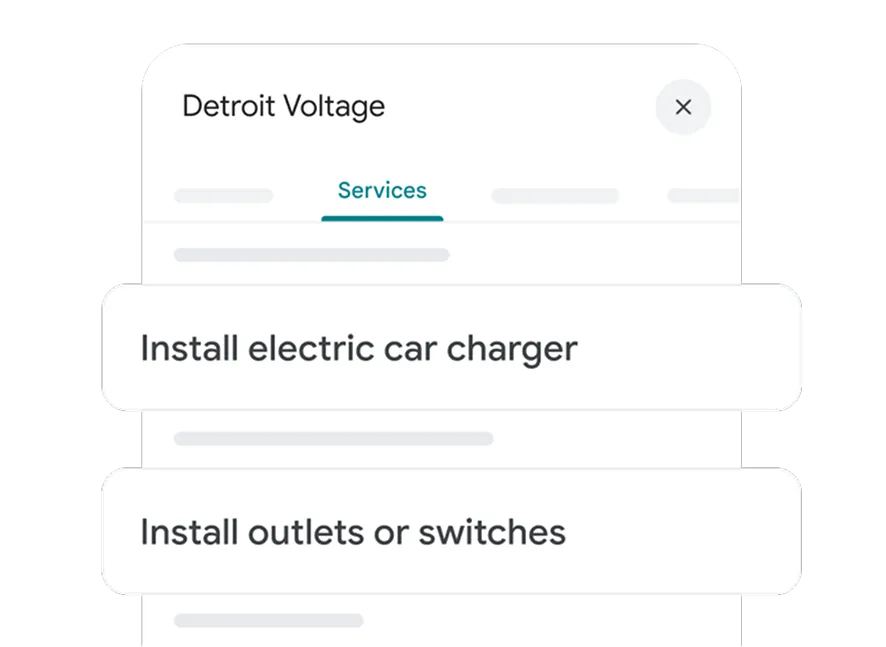
Specific services help a customer check whether you do the work they need.
Ask customers for Google reviews
After a job, you could send: “Thanks for choosing us. If you’d like to leave a review, here’s our Google link.”
Ask consistently, not just when you expect five stars. Don’t offer discounts or gifts for reviews. Google prohibits review incentives.
Get permission before sharing customer details or job photos.
Our local SEO services for electricians cover profile management and local search.
Turn your electrical website visitors into leads
Open your website on your phone. Check that your services, coverage and contact details are easy to find without searching through the menu.
For service calls, explain the visit. If there’s a visit or diagnostic charge, say how it works and when the customer approves more work.
If project estimates are free but diagnostic visits carry a fee, say which is which.
For projects, show the work you take and explain what happens before you quote. Use real job photos and examples you have permission to share.
Residential electrical service in [area]
- What we do: the jobs your team takes.
- Where we work: service areas and hours.
- How a visit works: what’s included and how charges work.
- Why choose us: real licensing details, job photos and reviews.
- Get in touch: call for availability or request a callback.
For a project page, the action might be “Request a project assessment.” Start with the location and a short description. Ask for detailed plans later if you need them.
Give different services their own pages when they need different explanations. Skip the near-identical pages for every small job or nearby city.
Finally, tap the phone link and send a labeled test through your form. Make sure the right person receives it.
See our website services for electricians if yours needs work.
Use Google Ads and LSA to get electrical leads
Before paying for traffic, check three things:
- You know which jobs you want.
- The page explains those jobs clearly.
- Someone can answer the calls and forms.
Set a test budget you can afford. There’s no single “right” price for an electrical lead.
Google Search ads for electricians
An ad for service visits should link to the service page. An ad for project work should link to a page explaining how to get an assessment and estimate.
You might need separate campaigns if the budgets, hours or locations differ. Ask your ads manager what each campaign controls and how they’ll report results by job type.
Set your Google Ads service area
Google’s default Presence or Interest setting can reach people outside your area who show interest in it.
Presence focuses on people likely to be in, or regularly in, your selected area. That can suit local service work. It can also miss an out-of-town owner arranging work on a local property.
Check the job address when someone calls, whichever setting you use. Location targeting isn’t exact. Google’s location settings.
Review your Google Ads search terms
Check for job seekers, training searches and services you don’t offer before adding exclusions.
The search terms report shows ad activity. It won’t tell you whether someone became a good lead, and some low-activity searches are hidden for privacy. Compare it with your inquiry records. About the report.
For more help, see Google Ads for electricians and our Google Ads budget guide.
Local Services Ads for electricians
Check whether LSA is available for your category and location. You’ll need a verified public Business Profile and must complete Google’s screening. The requirements vary, so use the checklist in your account. Approval can take time. US screening requirements.
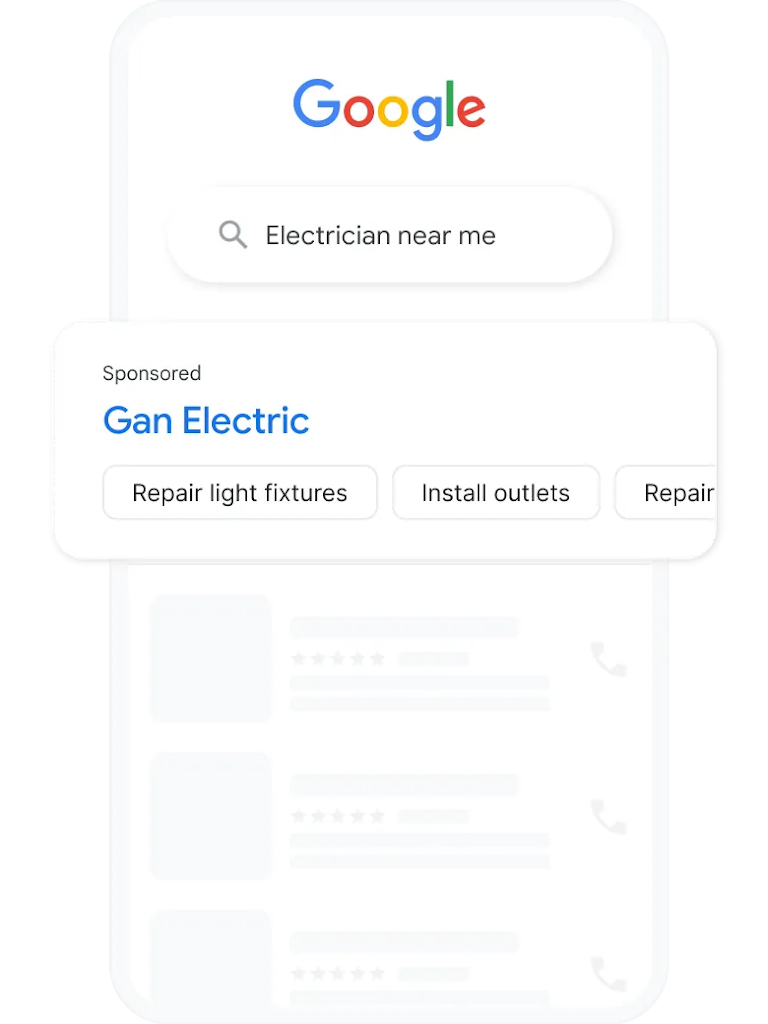
Notice the job types in Google’s electrician example. Check that your own selection matches your services.
You pay for valid leads. That doesn’t mean every charged lead becomes a job.
Check the job types, area and budget in your LSA account, then record which calls become jobs. Credits have conditions, so don’t assume every poor-fit lead will be refunded. How LSA charges work.
Our LSA vs. Google Ads guide helps you compare the two. Start with one and track the jobs it brings.
Get electrical referrals from customers and other trades
Tell customers and other trades which jobs you’re taking and where. That gives them enough information to recommend you to someone who needs that work.
For project work, start with remodelers, property managers and other trades you already know. Tell them your service area and availability before they refer a customer.
Try something like:
“We’re taking on [type of work] in [area]. If a customer needs help with that, here’s the best number for our office.”
Only promise hours and coverage you can deliver.
You can also share a recent job, with permission. Explain what the customer wanted, what your team did and how someone can ask about similar work. Leave out DIY electrical instructions and savings claims you can’t back up.
Track where referrals come from and which jobs they bring. Include the time you spend on those relationships when comparing costs.
What to check before buying electrical leads
With a lead marketplace, you’re paying for inquiries. With an ads manager, you’re paying someone to run your advertising.
Before buying leads, ask:
- Who else gets the lead? Find out exactly what “exclusive” means.
- Can you choose the work? Check job types, areas and which requests you’ll pay for.
- What’s the full cost? Include subscriptions, minimums and extra fees.
- When can you get a credit? Ask about evidence and deadlines.
- Can you pause or leave? Check what happens when your schedule fills.
Start small and track the test separately. Count suitable leads and completed jobs, plus the time spent chasing them.
Even when a provider sends a lead only to you, the customer can still contact other electricians. Judge the cost by the work you book, not just the price per inquiry.
Quips manages marketing. We don’t sell electrical leads.
Qualify electrical leads and book the next step
Keep these details in your existing job software, CRM or a document your office can update.
Agree on what makes a lead suitable: real work you offer, in an area you serve, at a time you can reasonably handle.
They don’t have to accept your quote to count. If you don’t know enough yet, mark them “not yet assessed.”
Electrical lead intake checklist
- Record: job or inquiry ID and first-contact date. Keep repeat contacts about the same job together. A new job gets a new record.
- Contact: name, callback number and preferred way to reply.
- Location: address or ZIP code. Confirm coverage before booking.
- Request: what they need, in their words. Leave diagnosis to a qualified electrician.
- Work type: service call, planned project or unsure.
- Timing: when they want it done and when you’re available.
- Access: who can let you in and approve the work?
- Source: campaign, referral or platform. If you don’t know, say so.
- Next step: who will call back, by when, and any appointment details.
- Outcome: suitable, unsuitable with a reason, or not yet assessed. Add dated updates for appointments, estimates, booked work, completed work and collected revenue. Note when you last checked.
For a service call, confirm the area, appointment and visit charge.
For a project, find out what they want and who needs to assess it before you quote. An estimate visit isn’t a booked installation.
If it sounds like an electrical emergency, follow your company’s safety procedure approved by a qualified person. Don’t delay emergency help or ask customers to investigate equipment.
Give a callback time you can meet: “I’ll check the schedule and call you by [time].”
After sending an estimate, agree on a follow-up date and ask whether the customer needs anything else before deciding.
Assign the callback or follow-up to a named person so it doesn’t get missed.
Track electrical lead costs and booked jobs
Pull costs from your ad account or supplier invoices. Use your inquiry records to count suitable leads, then check your job and payment records for completed work and money collected.
Keep service calls and projects separate. A service visit may be finished while a project customer is still deciding.
Group inquiries by when they first came in. An October inquiry that becomes a completed job in December stays with the October group. Record when you last checked its progress.
Here’s a made-up example. Two campaigns each spend $600 on ads during the same period. These aren’t customer results or industry benchmarks.
Scroll the table sideways to compare both types of work.
| Measure | Service visits | Planned projects |
|---|---|---|
| Unique inquiries | 12 | 8 |
| Suitable inquiries | 8 | 4 |
| Appointments / estimate visits | 6 | 3 |
| Jobs booked | 6 | 2 |
| Jobs completed by review date | 5 | 1 |
| Media cost per inquiry | $50 | $75 |
| Media cost per suitable inquiry | $75 | $150 |
| Media cost per completed job so far | $120 | $600 |
Divide ad spend by the result you’re checking:
- $600 ÷ 8 suitable service inquiries = $75 each.
- $600 ÷ 1 completed project = $600 per completed job so far.
No completed jobs? Write “no completed jobs yet.” You can’t calculate a cost per completed job with zero jobs. It isn’t $0.
The project campaign has a higher cost per completed job so far. One of its booked projects is still unfinished, so that figure can change.
You also need to know what the completed jobs brought in and what they cost to deliver. This table alone can’t tell you which campaign made money.
For a fuller cost comparison, add management, software and lead fees where they apply. Label that total separately from ad spend and use the same cost categories for both campaigns.
Find out why electrical leads aren’t booking
- Too many jobs outside your area? Check your coverage and targeting.
- Good leads, few appointments? Check missed calls, response times and availability.
- Estimates sent, little work booked? Look at scope, price objections and follow-up.
Check individual inquiries before changing the campaign. A small sample may reveal a missed callback or an area mismatch without telling you much about the channel overall.
Your first month of electrical lead generation
Week 1: Choose the jobs and service areas. Choose the jobs and areas you want. Look through recent inquiries. Check who answers the phone and test your form.
Week 2: Update your Google profile and website. Update your Google profile and the relevant website page. Make the next step and any visit charge clear. Start using the inquiry checklist.
Week 3: Test one lead source. Contact relevant trades you already know about referrals. If you have a useful landing page, someone to reply and a test budget, Search ads are another option. Check LSA eligibility before planning a test there.
Buying leads is another option once you understand the terms. Whichever you choose, write down the spending limit, who’s running it and when you’ll review it.
Week 4: Review bookings and follow up. Review which inquiries fit, which booked and who still needs a reply. Follow up on open estimates and record why other jobs didn’t book.
Keep tracking after the first month. Some projects take longer to book and finish.
If you already get plenty of inquiries, start with the ones that aren’t turning into jobs.
For help running your ads, local search or website, see our electrical marketing services.
Sources and examples
Google’s guidance is linked beside the relevant advice and was checked November 9, 2026. Features and eligibility can vary by account and location.
Use the checklist to record inquiries and the worked example to compare costs. All example numbers are fictional.